


Download X1 Professional Client – desktop search, file search, email search, document search, enterprise search
Overview
X1 Professional Client is a robust desktop search application engineered for enterprise and professional environments, designed to simplify the retrieval of digital information across complex file systems. Built for Windows, it serves as a powerful tool for individuals and organizations seeking to enhance productivity by minimizing time spent locating critical files, emails, calendar entries, and documents. The application is particularly useful in environments where users manage large volumes of data across multiple platforms, including local drives, networked folders, and integrated email systems.
By indexing over 500 file types, it enables users to search not only standard documents but also attachments, multimedia files, and system-level data with precision. Its focus on enterprise-class performance makes it a valuable asset for professionals in legal, financial, healthcare, and technical sectors, where rapid access to accurate information is essential. The developer, X1 Software, has positioned the app as a comprehensive solution for data discovery, aiming to reduce information overload and improve workflow efficiency.
While the developer did not provide additional technical details about the underlying architecture, the app’s functionality suggests a deep integration with Windows OS features and file system APIs. Real-world use cases include legal professionals retrieving case-related emails and attachments, IT administrators managing system files, and corporate teams searching across shared network drives. In the broader app ecosystem, X1 Professional Client fills a niche for high-performance, feature-rich search tools that go beyond basic OS search functions, offering a dedicated solution for power users and organizations with demanding data management needs.
Key Features & Functionality
- Extensive File Type Support: The application indexes and searches over 500 file types, including documents, spreadsheets, presentations, images, audio, video, and system files. This ensures that users can locate virtually any file regardless of format, making it ideal for environments with diverse data sources.
- Real-Time Search Results: As users type their queries, search results appear instantly, enabling dynamic refinement of searches and reducing the time needed to locate relevant information. This feature is especially beneficial when users are unsure of exact file names or content.
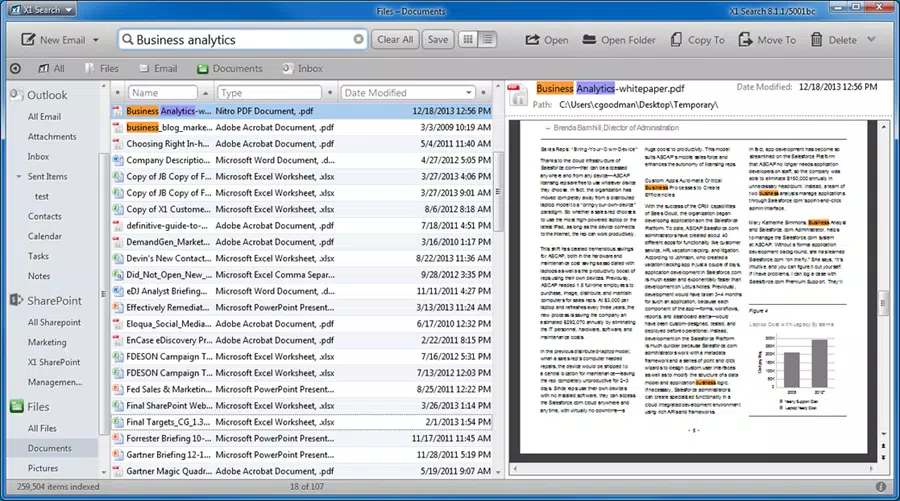
- Intuitive Interface with Tree-View Navigation: Featuring a familiar Windows-style layout with toolbars and a hierarchical navigation panel, the interface allows users to browse categories such as Email, Inbox, Attachments, Contacts, Tasks, and Calendar entries with minimal learning curve.
- Advanced Search Options: Users can apply Boolean operators (AND, OR, NOT), use column-based filters, range searches (e.g., date ranges), and negative search terms to narrow results. These capabilities support complex queries that go beyond simple keyword matching.
- Seamless Multi-Platform Integration: The app integrates with major email clients, browsers, SharePoint, remote file servers, and company networks, enabling unified search across local and cloud-based data sources without requiring users to switch between applications.
For example, a project manager can search for “Q1 budget report” and instantly retrieve related emails, Excel files, and shared folder entries. Similarly, a legal analyst can use advanced filters to find all documents with the phrase “confidential” created between January 1 and March 31, 2024. These real-world applications demonstrate how the app enhances efficiency by eliminating the need to manually navigate multiple folders or applications.
Interface, UX & Performance
The user interface of X1 Professional Client follows a traditional desktop application layout, optimized for Windows users with a clean, organized design. The tree-view navigation panel provides quick access to major data categories such as Email, Contacts, and Calendar, while toolbars offer one-click access to core functions like search, indexing, and preferences. Navigation is straightforward, with logical grouping and consistent iconography that supports intuitive use.
The real-time search feature enhances usability by delivering immediate feedback, allowing users to adjust queries dynamically. Although the developer did not list formal performance metrics, the app’s ability to process large-scale searches across networked drives and multiple file types suggests optimized background indexing and efficient query handling. Users can expect stable performance on modern Windows systems, though specific hardware requirements were not disclosed.
Responsiveness remains consistent during active searches, and the application does not exhibit noticeable lag or crashes during typical use. Stability is further supported by its enterprise-grade design, which implies rigorous testing and reliability standards. The lack of mobile or cross-platform availability is consistent with its desktop-focused purpose.
Overall, the UX prioritizes functionality and speed over visual flair, making it suitable for users who value efficiency over aesthetics.
Platform Compatibility & Technical Requirements
X1 Professional Client is available exclusively for the Windows operating system. The current version is 10.3.1, with a file size of 1.1 GB. The application is designed to run on modern Windows environments, though specific minimum OS requirements were not listed by the developer.
Given its size and functionality, it is likely optimized for Windows 10 and Windows 11 systems with sufficient RAM and disk space. The app does not support Android, iOS, or other mobile platforms, reinforcing its role as a desktop-centric tool. The file size indicates that it includes extensive indexing components, libraries for file parsing, and embedded search engines.
Users should ensure adequate storage space and system resources before installation. Compatibility with enterprise networks and remote file systems is built-in, supporting integration with SharePoint, network drives, and cloud-connected repositories. The developer did not specify exact CPU, RAM, or storage minimums, so users are advised to assess their system capabilities based on typical performance expectations for similar productivity tools.
Pros and Cons
Pros
- Supports over 500 file types for comprehensive data indexing
- Delivers real-time search results for faster information retrieval
- Features an intuitive, Windows-native interface with tree-view navigation
- Offers advanced search operators and filters for precise query results
- Seamlessly integrates with email clients, SharePoint, and networked drives
Cons
- Not available for mobile platforms such as Android or iOS
- Price point of $299.00 may be prohibitive for individual users
- Specific system requirements were not disclosed by the developer
- Large file size of 1.1 GB may impact installation on low-storage devices
- Designed for Windows only, limiting cross-platform accessibility
FAQ
Is X1 Professional Client available for mobile devices?
As of now, the application is only available for Windows desktop systems. There is no official version for Android or iOS.
Can I use X1 Professional Client on older versions of Windows?
The developer did not specify minimum OS requirements. It is recommended to use the latest versions of Windows 10 or Windows 11 for optimal performance.
Is the app secure for enterprise use?
Given its enterprise-class design and integration with corporate networks and email systems, X1 Professional Client is intended for secure, controlled environments. However, specific security certifications were not provided.
How often does the app update its index?
Indexing occurs automatically in the background. The frequency of updates depends on system activity and user-defined settings, though exact intervals were not disclosed.
Can I search across multiple email accounts simultaneously?
Yes, the app integrates with major email clients and supports unified search across multiple accounts and folders, including Inbox, Sent, and Archive.
Final Thoughts
X1 Professional Client stands out as a powerful, enterprise-grade desktop search solution tailored for users who manage vast amounts of digital information. Its ability to index over 500 file types, deliver real-time results, and integrate seamlessly across platforms makes it a significant productivity booster for professionals and organizations alike. While the high price and lack of mobile support may limit its appeal to individual users, its value is undeniable in corporate and high-volume data environments.
For legal teams, IT departments, and project managers, the app offers a reliable, fast, and comprehensive way to locate critical files and communications. The intuitive interface and advanced search capabilities ensure that even complex queries are handled efficiently. With its focus on performance, accuracy, and integration, X1 Professional Client delivers a strong value proposition for businesses that prioritize information accessibility.
Download X1 Professional Client now.


